
What If Going Live Didn't Mean Leaving Everyone Else's Feed?
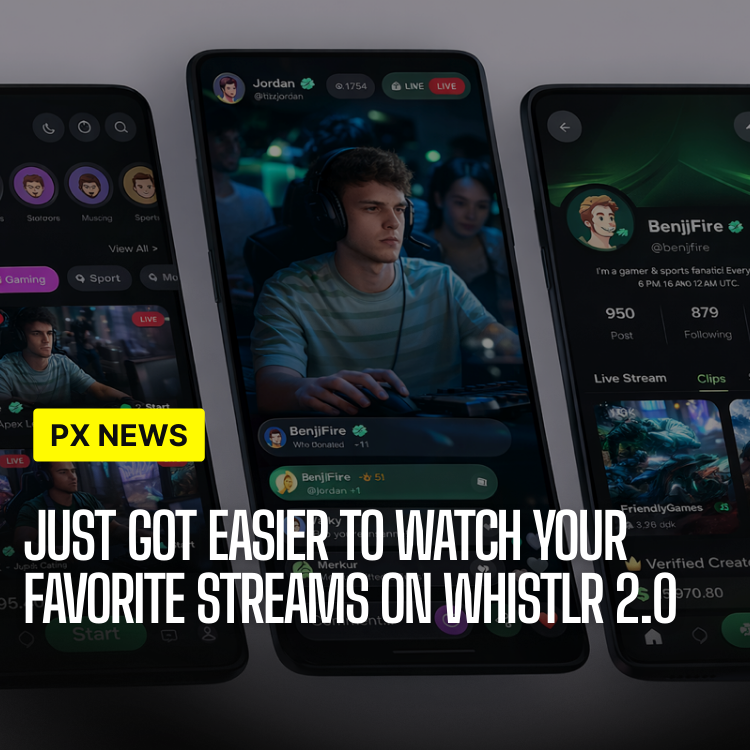
Most apps treat live video as an event you have to go looking for — a separate tab, a separate feed, a separate habit. Whistlr's live streaming update takes the opposite approach: live now shows up wherever you already are.
That single decision — integration over isolation — shapes almost everything else about this release. Multi-platform broadcasting, interactive live tools, and a redesigned live player all matter less than the underlying choice to stop treating live streaming as its own destination inside the app.
It is also a bet that runs against how a lot of the industry still builds live video. Plenty of platforms treat live as a premium, separate experience — its own icon, its own onboarding, its own rules. Whistlr's live team argues that framing is backwards for a social app, where the whole point is that live content is just another way someone you know, or someone in your community, is showing up right now.
The Old Way: Live as a Silo
Whistlr's original live streaming setup worked the way most platforms' live features work: a dedicated Live tab, its own discovery feed, its own notification type. It functioned fine as a standalone product, but it also meant live content competed with everything else in the app for a user's attention instead of surfacing naturally inside feeds people were already scrolling through every day.
Internal usage data told a fairly blunt story. Streams got real viewership from a creator's existing followers, who received a push notification and came looking. Discovery from people who were not already following the streamer was minimal, because nothing in Minis, Chattr, or Circuts pointed toward it — a live stream might as well not have existed for anyone not already inside the Live tab at the right moment.
Smaller and newer creators felt this hardest. A creator with an established following could rely on notifications to pull in a respectable audience regardless of discovery. A creator just starting out, with little to no existing follower base, had almost no path to being found while live at all — the Live tab's own discovery feed tended to surface streams that were already large, which made it structurally difficult for a new streamer to ever break in.
Live, Now Woven Into Every Feed
The fix was structural rather than cosmetic. Live streams now surface as native cards directly inside Minis, Chattr, and Circuts while they are happening, ranked using the same relevance signals that decide what other content shows up in those feeds. A live stream from someone you follow, or one gaining fast engagement in a community you are active in, appears in your feed the same way a Minis video or a Chattr post would — not as a banner interruption, but as a card you can tap into and out of without losing your place in the feed underneath it.
Tapping a live card opens the stream in an overlay rather than a full navigation away from the feed, and backing out returns a viewer to exactly where they were scrolling. That sounds minor, but it was one of the more difficult engineering problems in the release — the old Live tab could assume it owned the whole screen. The new integrated player has to coexist with three different feed architectures without breaking any of them.
Ranking live content alongside regular posts also meant deciding how much weight "happening right now" should carry against the usual relevance signals. The team settled on a time-decay boost that fades once a stream has been running for a while, rather than a flat priority bump for the entire broadcast — so a stream gets a meaningful nudge toward the top of a feed early on, when discovery matters most, without permanently crowding out other content for viewers scrolling an hour later.
Multi-Platform Broadcasting
Streamers can now broadcast to Whistlr Live and external platforms simultaneously from a single stream key, rather than running separate encoder setups for each destination. At launch, that includes direct simulcasting support alongside standard RTMP output for any platform or custom destination a creator's existing software already supports.
The encoding side was rebuilt specifically to make this possible without doubling a streamer's upload bandwidth requirements. Whistlr's ingest servers now handle the fan-out to connected destinations server-side, so a creator's own connection only has to sustain one outbound stream instead of a separate one for every platform they simulcast to — a meaningful difference for anyone streaming from a home connection rather than a studio setup.
For creators who built an audience elsewhere before coming to Whistlr, this removes a real piece of friction — they no longer have to choose which platform gets their live attention on a given night, or run a second laptop just to duplicate a stream manually. Chat from Whistlr viewers stays inside the Whistlr app, kept separate from other platforms' chat streams rather than merged into one confusing feed no one can follow.
Stream quality adapts per destination as well, rather than sending the same fixed bitrate everywhere regardless of what each platform actually supports or what a given viewer's connection can handle. A viewer watching on a weaker mobile connection inside the Whistlr app gets a lower, more stable bitrate automatically, while a desktop viewer on a fast connection gets the highest quality the stream was encoded at — without the streamer having to configure any of that manually before going live.
Interactive Live Features
Alongside broadcasting and feed integration, this release adds a set of interactive tools aimed at making live streams feel less like a one-way broadcast and more like a shared room:
- Live polls — streamers can push a poll directly into the video overlay and watch results update in real time without leaving the stream.
- Pinned questions — viewers can submit questions that stack in a queue the streamer can pin, answer, and clear without scrolling through a fast-moving chat.
- Reaction bursts — tap-and-hold reactions now animate across the stream for everyone watching, instead of only appearing as text in the chat log.
- Co-streaming — two creators can now share a single live session with a split-screen layout, useful for interviews, collaborations, and reaction streams.
Each of these was scoped specifically for the integrated feed context rather than ported over from the old standalone Live tab. Pinned questions, for example, only makes sense once a stream is regularly being discovered by viewers who don't already know a creator's usual chat culture — it gives a new viewer a low-pressure way to engage without wading into a fast-scrolling conversation they just joined mid-stream.
"A live stream shouldn't feel like a broadcast you happen to be watching. It should feel like a room you walked into. Every feature in this release is aimed at that difference."
Sofia Marquez, Director of Live Experiences
A Stream, Start to Finish
In practice, a creator going live now shows up as a card in their followers' Chattr and Minis feeds within seconds of starting a broadcast, simultaneously mirrored to whatever external platform they have connected. A viewer scrolling Chattr taps in, watches, fires off a reaction, answers a pinned poll, and taps back out to keep scrolling — without ever having opened a Live tab at all. Early internal testing during the beta period showed a meaningful lift in viewers reached per stream compared to the old tab-based discovery model, largely from people who were not already following the streamer before the broadcast started.
Live streaming was one of the last major surfaces in Whistlr still operating like a separate app bolted onto the platform. This release folds it into the rest of the product instead, and the team expects that to compound over time — every future improvement to Minis, Chattr, or Circuts discovery now benefits live content automatically, instead of requiring a parallel fix inside a walled-off Live tab somewhere else in the app.
The standalone Live tab is not disappearing entirely — it remains as a dedicated space for browsing everything live at once, which still has a use case of its own. But it is no longer the only way, or even the primary way, that most viewers are expected to encounter a stream. That shift, more than any single feature in this release, is the actual story of live streaming on Whistlr going into the rest of the year.
For smaller and newer streamers specifically, the team is watching one number closely over the coming months: what share of a stream's viewers came from feed discovery rather than an existing follow. Early numbers from the integrated model are encouraging, but the real test is whether that holds up once the novelty of a new feature fades and live cards are just another normal, familiar thing to scroll past — or tap into — on an ordinary afternoon.